Your Río Hondo Office 365 account (email, contacts, calendar, notes, and tasks) can be used on your iOS device. Use the following instructions to configure your iOS device:

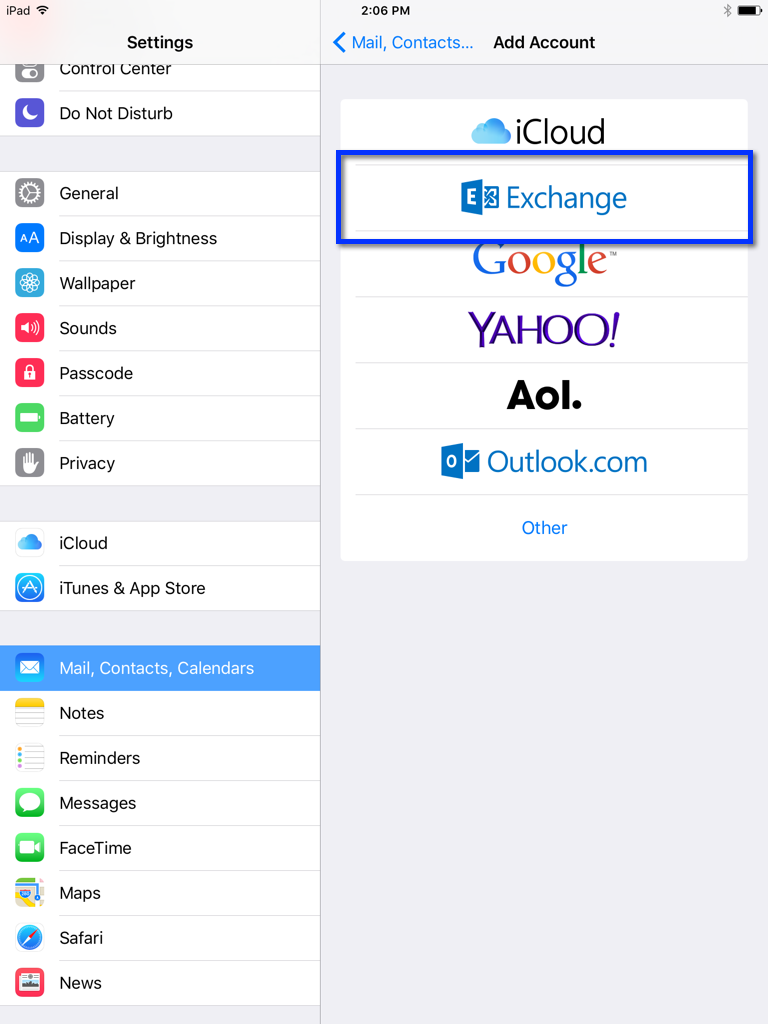
Open Settings > Mail, Contacts, Calendars > and select Add Account…

IPad settings screen open to "Mail, Contacts, Calendars" with steps highlighted to add a new email account.

Select Exchange

IPad screen showing the "Mail, Contacts, Calendars" settings with the "Exchange" account option highlighted.

Enter your Río Hondo email address and password. Give the account a description (e.g., Work, Río Hondo, etc.)
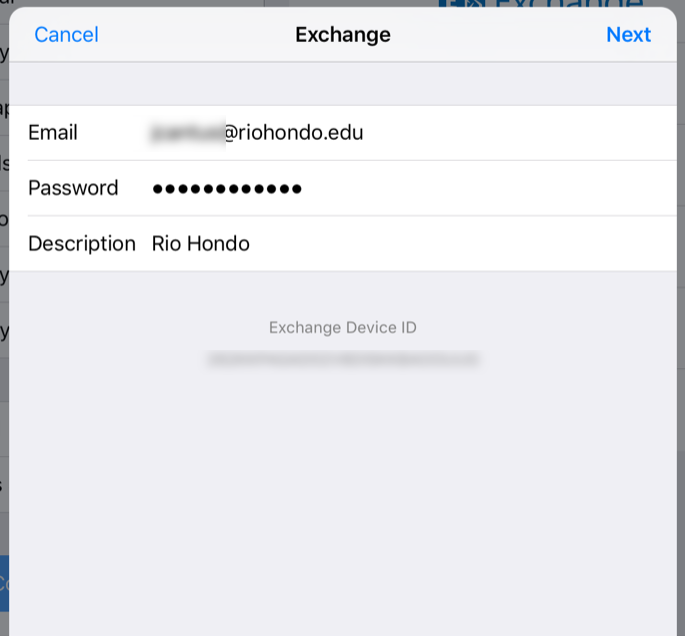
Screenshot of an Exchange email account setup screen showing fields for email, password, and description with "Rio Hondo" entered. The Exchange Device ID is displayed at the bottom.

Select the services you would like to synchronize with your device

An email Exchange settings screen showing Mail, Contacts, Calendars, Reminders, and Notes options, all toggled on.