



Questions? We Have Answers!
Find the information you need about applying, registering, wait lists, authorization codes, fees, transcripts, and more.
Application and Registration
-
How do I apply?
Submit an online application. For additional information on the application process, click here.
-
What is the next step after I apply?
Review the getting started page.
-
What is my username to log in to AccessRío?
Username format is:
First Name.Last Name and last 4 digits of Student ID
Example: john.smith1234
-
What is my password to log in to AccessRío?
Your password is your 6-digit birthday, example: 120895 if born on December 8, 1995. If you are having problems logging in, please contact Technical Support.
-
How do I check for holds on my records?
You can check your student portal for any holds on your record. For step-by-step instructions, please watch the video: How to view holds
-
What if I do not have a registration time ticket?
If you do not have a registration time ticket, it may be because you have not applied for the semester you are attempting to register for, or your application has not yet been processed. Please allow 24–48 hours for processing. Once your application is processed, you will be able to register for classes at your assigned time.
-
When is my registration date?
Your registration date can be located either on our registration dates and times page or through AccessRío:
- Log in to AccessRío
- Click the Registration tab
- Click Registration Status
-
How do I register or add a class?
To learn how to register or add a class, please watch the following video for step-by-step instructions: How to add a course
-
How do I drop a class?
To learn how to drop a class, please watch the following video for step-by-step instructions: How to drop a course
-
What if the class is full?
If the class is full, you should add yourself to the waitlist before the semester begins. Once the semester starts, you will need to attend the class to see if the instructor can provide you with an add code.
If the class is online, please email the professor to ask if you may receive an add code. You can find the professor’s email address next to the CRN when viewing the class schedule.
-
What should I do if my class is cancelled?
You may be notified by the department if your class is canceled. Please connect with a counselor to help you find another class. Your fees will automatically be adjusted or refunded.
-
Can I register on campus or by phone?
All registrations must be completed electronically through AccessRío. Please watch the following video for step-by-step instructions: How-To Tutorial: Add/Drop a Course
-
What is a prerequisite?
A prerequisite is a course that must be completed before enrolling in your desired course. If you have questions, please contact the Counseling Center for assistance.
-
Do I need official transcripts to clear a prerequisite?
Yes. If you are using a class taken at another school, official transcripts must be on file to clear the prerequisite. Please send official transcripts to [email protected].
You should also bring any supporting documentation (e.g., syllabus, catalog description) from the other school to help your counselor establish equivalency. Please contact the Counseling Center for prerequisite clearance.
-
What is CRN?
The CRN (Course Reference Number) is a five-digit number that identifies a specific section of a course. This CRN is essential for students to identify and register for specific courses. The CRN is found in the college’s class schedule and is used during the registration process
-
How to review critical dates for a specific course?
-
Go to the Class Schedule and find your class.
-
Click on the CRN number for the class.
-
Make sure this is the exact class you are enrolled in, or the dates may be incorrect.
-
-
Review the “Critical Dates for this Course” section to see important deadlines and dates.
-
Wait List Questions
-
What is a waitlist?
A waitlist is a line of students waiting for a seat to be open that is already full. The following tutorial shows how to join or leave a waitlist using AccessRio.
-
How does a waitlist work?
When you register for classes, each course has a limited number of seats. Once all available spots are taken, the class becomes full. That is where the waitlist begins. Once a class is full, you will see the option to add yourself to the waitlist.
-
How can I confirm if I am on the waitlist?
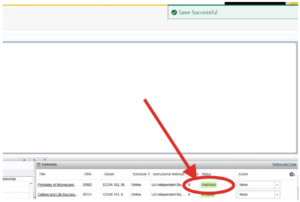
On AccessRío, go to the Registration page. On the Summary tab, look under the “Status” column. The status for the course should say waitlisted.
-
I joined a waitlist—what now?
Great! You are now in line for an open seat. If a seat opens and it is your turn on the waitlist, you will be automatically enrolled in that class. Our system checks for open seats every 5 minutes. You may regularly check your RíoMail inbox for notifications regarding your waitlist status.
-
How can I see my waitlist position?
The following video provides instructions on how to view your waitlist position using Access Río.
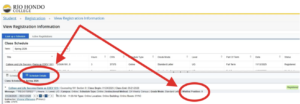
On AccessRío, go to the Registration page. The go to View Registration Information. Select the appropriate term and select the Schedule Details button. Look for the “Waitlist Position” text, and the number that follows is your position number.
-
When is the last day to join a waitlist?
The option to join a waitlist will close on the first day of the course. Students who were already waitlisted prior to the start date of the course will remain on the waitlist roster.
-
Do all classes have waitlists?
Not all classes will have a waitlist. Classes that are restricted for certain cohorts or those that are not available for open enrollment might not have a waitlist and will close once all seats are filled.
-
Will joining the waitlist guarantee me a spot?
Unfortunately, being on a waitlist does not guarantee that you will join the course.
-
Does joining or leaving a waitlist appear on my transcripts?
No, it will not since you do not receive a letter grade.
-
What are my options if I still am on the waitlist by the start date of the course?
You may either speak with the instructor to see if you can obtain an add code to join the course, or remove yourself from the waitlist.
-
Is there a way to see if a class has no available seats and is already waitlisted?
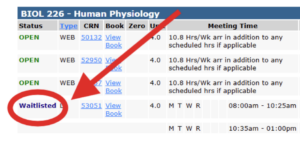
Yes! Please visit the View Class Schedule page on the Río Hondo College homepage. Once you have searched for course, look for the “status” column for the designated course.
-
How can I see if a waitlist has started for a class and how many students are in the waitlist?
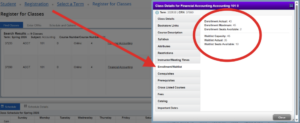
On AccessRío, visit the page. Then, click on the course name that is underlined. Then, click on the Enrollment/Waitlist tab on the popup menu. Information will be displayed as seen in the red circle.
Add Authorization Code
-
What is an Add Code?
An “add code” is a special authorization code given by the instructor to allow a student to enroll in a course that is otherwise full, waitlisted, or closed. This code is used to add the class to your schedule in the college’s registration system, AccessRío.
-
How do I get an Add Code?
- For an in-person class, attend the class and ask the instructor if they can provide you with an add code. It is at the discretion of the instructor to provide students with an add code.
- For an online class, you must contact the instructor via email and ask if they can provide you with an add code. Please include the five-digit CRN in your email. It is at the discretion of the instructor to provide students with an add code.
Please note: Add codes are issued at the instructor’s discretion.
-
When can I use the Add Code?
- Add codes generally become active on the fourth day of instruction; however, students may self-enroll before that time if space is available.
Example:
- Online course: If the second half course begins Sat., March 28, add codes will be activated for use on Tues., March 31.
- In-Person course: If the course meets on Mon., March 30, add codes will be activated for use on Thu., April 2.
Need to add sooner? If you believe you need to be added before the fourth day, please contact the Admissions & Records office for guidance.
Step-by-Step Instructions
For a visual walk-through on how to enter an add code into the AccessRío, watch this tutorial: How to Use an Add Code
Need Help?
If you run into technical issues or have questions about your registration status, contact Admissions & Records:
- Phone: (562) 463-7639
- Email: [email protected]
Fees/Refunds/Tax Information
-
How much are the registration fees?
For a full breakdown, view the Enrollment Fees, Paying Your Fees, and Student Financial Obligations page or contact the Cashier’s Office at (562) 463-7097.
Cashier’s Window – In-Person Assistance SS180
-
Do I need any paperwork to receive a refund?
No. All refunds are processed automatically after the last day to drop classes with a refund has passed.
-
When do refunds get processed?
Refunds are processed after the last day to drop classes with a refund has passed.
Please check the Important Dates and Deadlines for your semester.
Please note: Some classes have different start and end dates, which means the refund drop date may vary by class. Always review the class schedule to confirm the drop date for each course you are enrolled in.
If you need help finding your drop date, please review the step-by-step instructions for viewing drop dates.
-
When will I get my refund?
Your refund will be mailed to the address on record. It should arrive about 45 business days after the last day to drop classes with a refund has passed.
-
How do I get a copy of my IRS Form 1098-T for my taxes?
To get a copy of your 1098-T, click here.
-
When are my fees due?
Fees are due as soon as you register for a class. Failure to pay your fees promptly will prevent you from registering for the next term and from receiving transcripts. A hold will remain on your record until the fees are paid.
-
How do I pay my enrollment fees?
You can pay your enrollment fees through AccessRío, or in person at the payment window during the first two weeks of the semester.
-
Why am I being charged Out of State fees?
For more information, please visit the Undocumented, AB540, and DACA Information page.
When you filled out your application to attend Río Hondo College, there were a number of questions you were required to answer. Some of these questions are used to automatically determine your residency status.
If you have been a California resident for 1 year and 1 day prior to the start of the semester, you can come to the Admissions and Records office to petition to have your residency changed.
You will need to fill out a Supplemental Residency Questionnaire and bring supporting documentation to prove that you are a California resident.
Student Information/Login Information
-
How will I receive my student number?
Your student number will be included in the Welcome email you receive after your application has been processed. Please check your spam or junk folder if you don’t see an email from Río Hondo College within 24–48 hours.
If you still haven’t received it, contact the Admissions & Records Office:
Admissions & Records Office
Student Services Building – Room SS120Phone: (562) 463-7639
Email: [email protected] -
How do I recover my forgotten student ID number?
To recover a forgotten student number, you can:
-
Visit the Admissions & Records counter with a valid photo ID.
- Submit a request online by filling out Recover Student ID Number.
Please note:
-
If your name has changed since attending Río Hondo College, you must provide supporting documentation (e.g., court/divorce documents, marriage license).
-
For online requests, your student ID number can only be emailed to the address currently on file.
Admissions & Records Office
Student Services Building – Room SS120Email: [email protected]
-
-
Why can't I get my student ID number over the phone?
We are unable to disclose a student ID number over the phone because this is confidential information.
You can either:
-
Join us via Zoom and present a valid government-issued photo ID, then answer a few verification questions.
-
Visit the Admissions & Records Office in person with a valid government-issued photo ID.
Admissions & Records Office
Student Services Building – Room SS120
Río Hondo College
3600 Workman Mill Road, Whittier, CA 90601Email: [email protected]
-
-
How do I retrieve a lost login for AccessRío?
You will need to contact Technical Support.
Transcripts/Verification
-
How do I request my official transcripts?
Visit our transcripts page.
-
How do I get unofficial transcripts?
Visit our transcripts page.
-
How do I find the status of my transcripts request?
Visit our transcripts page.
-
How do I get verification of my enrollment or degree?
Visit our verification page.
Miscellaneous
-
What does Pass / No Pass mean?
Taking classes “Pass / No Pass” means that you are requesting to receive credit for a course without receiving a letter grade of A, B, C, D, or F. As long as you earn the equivalent of an A, B, or C, you will receive a “Pass” for the grade of record on your official transcript. If you earn the equivalent of a D or F, you will receive a “No Pass”. Classes taken “Pass / No Pass” do not affect your GPA.
In addition to courses in which all students are evaluated on a “Pass / No Pass” basis, students may enroll in one course each semester on a “Pass / No Pass” basis. They may elect at registration, or no later than the end of the third week, whether the basis of evaluation is to be “Pass / No Pass” or a letter grade. (For summer school, this is by the end of the first week.)
Important: Students will not be allowed to request a letter grade after the dates listed on the Río Hondo College website, nor request a letter grade for previously completed courses in which they earned a “Pass”.
-
What is the last day to drop a class without a "W"?
This depends on the class format. The three most common formats are full term, first half, and second half. The drop dates for these classes can be viewed on the Important Dates and Deadlines page.
Please note that many classes are offered in other formats and have different drop dates unique to the class. It is recommended that students refer to the class schedule to verify the drop date for each specific class they are enrolled in.
-
How can I get more information about Graduation/Commencement?
Visit our Graduation page for more information on Graduation and Commencement. If you still need more information please drop by the Admissions and Records office (Room SS-120) or contact us for more information.
-
How many units must I take to be considered full-time?
For the Fall and Spring semesters, the minimum requirement to be considered full-time is 12 units. During the Summer semester, the minimum is 4 units.
-
What does an "R" mean on my class schedule?
An “R” on your class schedule means the class meets on Thursdays.